voltar aos guias

Foto Dia da Criança.

Passo a passo para criares a tua imagem e animares.

Passo 01

Ir ao ChatGPT, dar 2 fotos (foto da criança e foto adulto) e usar este prompt:

Se tiveres a versão paga do ChatGPT, ativa o modo thinking para que a foto saia com melhor qualidade!

Create a new image:
On the left: a child version of me (from a childhood photo) looking with an innocent smile to the right. On the right: A present version of me (from a recent photo) sits with her hands under her chin and looks at the child with a calm smile. Studio background: plain and soft (studio background). The lighting: Soft, cinematic, warm (even a black-and-white photo). Style: Professional minimal emotional photography, focusing on feelings and visual communication between the two versions. Make the picture look so real like a real photoshoot between the two versions. Keep my original features without changing. The faces must match the original pictures. Make the faces more towards the camera - make it look like the picture was getting taken straight not from an angle and match the faces. Make it look realistic. I don't want it to be black and white. Keep it with the original photo colours, keep the faces realistic. Make the original faces.

Eu sei que a maior parte das pessoas diz: "Ah é super fácil criar isto." A verdade é que é, muitas vezes, para encontrarmos o resultado final que queremos, temos que fazer mais do que uma tentativa, mais do que um resultado. Por isso se não gostares do primeiro que ele te dá, não tenhas problemas em fazer mais.
Passo 02

Dá vida à imagem com uma ferramenta de animação por IA

Depois de criares a imagem, podes dar-lhe vida e transformá-la em vídeo com uma ferramenta de animação por IA. (eu usei o Kling dentro do Higgsfield), mas podes experimentar o Runway, que tem algumas gerações gratuitas: runwayml.com

Como proceder:

  1. Cria uma conta gratuita no Runway
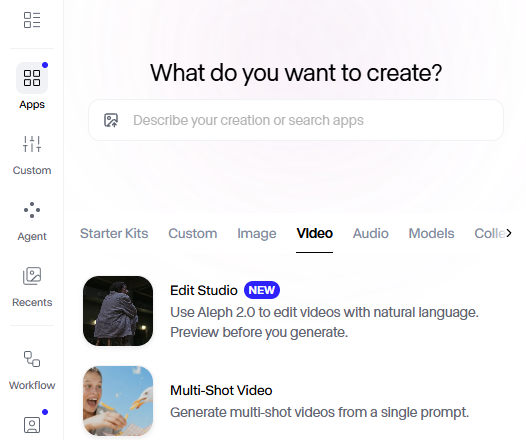
  2. Experimenta o modo multi-shot videos
Captura de ecrã do Runway a mostrar o modo Multi-Shot Video

E dá este prompt:

Create a soft nostalgic cinematic video using the uploaded then-and-now portrait of the same girl. Animate the child version on the left with gentle blinking, tiny hand movement, looking toward the future self. Animate the present woman on the right with subtle breathing motion, slight hair movement, warm emotional smile, hands under chin, looking lovingly at her younger self. Add warm vintage tones, soft beige studio background, subtle film grain, dreamy light rays, and a glowing connection light between both versions. Use slow push-in camera zoom and delicate parallax depth movement. Add emotional cinematic close-up shots: - Slowly zoom into the little girl's hands while she hugs her older self. - Show a detailed close-up of the child gently wrapping her arms around the older woman's shoulders. - Add a soft focus shot of their hands touching and holding each other. - Include a gentle camera movement around them during the hug to create emotional depth. - Let the hug feel natural, warm, and deeply emotional. - Keep expressions natural and heartfelt. End with both smiling at each other and softly hugging. Ultra realistic, preserve original facial features, cinematic emotional storytelling, smooth motion, high detail.

Agora é a tua vez.

Pensa na tua versão de cinco anos.

O que lhe dirias hoje, com tudo o que já viveste?

Guarda este guia